How to calibrate sub-networks of pre-trained models#
Fortuna’s calibration model offer a simple interface to train or fine-tune a deep learning model. The user is free to choose a custom calibration loss, select an optimizer, decide which parameters to train or fine-tune, monitor calibration metrics, and more. In this example, we look at some of its main functionalities.
Download, split and process the data#
First, we download the data from TensorFlow, and split them into training, validation and test set.
[1]:
import tensorflow as tf
import tensorflow_datasets as tfds


def download(split_range, shuffle=False):
    ds = tfds.load(
        name="mnist",
        split=f"train[{split_range}]",
        as_supervised=True,
        shuffle_files=True,
    ).map(lambda x, y: (tf.cast(x, tf.float32) / 255.0, y))
    if shuffle:
        ds = ds.shuffle(10, reshuffle_each_iteration=True)
    return ds.batch(128).prefetch(1)


train_data_loader, val_data_loader, test_data_loader = (
    download(":80%", shuffle=True),
    download("80%:90%"),
    download("90%:"),
)
2023-09-26 07:28:46.082068: I tensorflow/core/platform/cpu_feature_guard.cc:182] This TensorFlow binary is optimized to use available CPU instructions in performance-critical operations.
To enable the following instructions: AVX2 AVX512F FMA, in other operations, rebuild TensorFlow with the appropriate compiler flags.
/home/docs/checkouts/readthedocs.org/user_builds/aws-fortuna/envs/stable/lib/python3.10/site-packages/tqdm/auto.py:21: TqdmWarning: IProgress not found. Please update jupyter and ipywidgets. See https://ipywidgets.readthedocs.io/en/stable/user_install.html
  from .autonotebook import tqdm as notebook_tqdm
We then convert the data loaders into something that Fortuna can work with.
[2]:
from fortuna.data import DataLoader

train_data_loader = DataLoader.from_tensorflow_data_loader(train_data_loader)
val_data_loader = DataLoader.from_tensorflow_data_loader(val_data_loader)
test_data_loader = DataLoader.from_tensorflow_data_loader(test_data_loader)
Define and calibrate the calibration model#
We now introduce CalibClassifier, i.e. Fortuna’s calibration classifier purposed to obtain calibrated predictions.
[3]:
from fortuna.model import LeNet5
from fortuna.calib_model import CalibClassifier
WARNING:jax._src.xla_bridge:No GPU/TPU found, falling back to CPU. (Set TF_CPP_MIN_LOG_LEVEL=0 and rerun for more info.)
[4]:
calib_model = CalibClassifier(model=LeNet5(output_dim=10))
WARNING:root:No module named 'transformer' is installed. If you are not working with models from the `transformers` library ignore this warning, otherwise please install the optional 'transformers' dependency of fortuna.Using poetry, you can achieve this by entering: `poetry install --extras "transformers"`
Let’s calibrate this model! At first, we will run the calibration from scratch, thus this can just be seen as training the model. By default, the calibration exploits a focal loss Mukhoti et al., 2020 with gamma=2., but other custom losses may be used. During the calibration, we will enable early stopping and monitor accuracy and Brier score - we will just have to adust the signature to make sure
it is compatible with one that the CalibClassifier expects.
[5]:
from fortuna.calib_model import Config, Monitor
from fortuna.metric.classification import brier_score, accuracy


def brier(preds, uncertainties, targets):
    return brier_score(uncertainties, targets)


def acc(preds, uncertainties, targets):
    return accuracy(preds, targets)


status = calib_model.calibrate(
    train_data_loader,
    val_data_loader=val_data_loader,
    config=Config(monitor=Monitor(early_stopping_patience=2, metrics=(brier, acc))),
)
2023-09-26 07:28:50.300583: I tensorflow/core/common_runtime/executor.cc:1197] [/device:CPU:0] (DEBUG INFO) Executor start aborting (this does not indicate an error and you can ignore this message): INVALID_ARGUMENT: You must feed a value for placeholder tensor 'Placeholder/_2' with dtype string and shape [1]
         [[{{node Placeholder/_2}}]]
2023-09-26 07:28:50.301451: I tensorflow/core/common_runtime/executor.cc:1197] [/device:CPU:0] (DEBUG INFO) Executor start aborting (this does not indicate an error and you can ignore this message): INVALID_ARGUMENT: You must feed a value for placeholder tensor 'Placeholder/_4' with dtype int64 and shape [1]
         [[{{node Placeholder/_4}}]]
2023-09-26 07:28:56.835932: I tensorflow/core/common_runtime/executor.cc:1197] [/device:CPU:0] (DEBUG INFO) Executor start aborting (this does not indicate an error and you can ignore this message): INVALID_ARGUMENT: You must feed a value for placeholder tensor 'Placeholder/_4' with dtype int64 and shape [1]
         [[{{node Placeholder/_4}}]]
2023-09-26 07:28:56.836865: I tensorflow/core/common_runtime/executor.cc:1197] [/device:CPU:0] (DEBUG INFO) Executor start aborting (this does not indicate an error and you can ignore this message): INVALID_ARGUMENT: You must feed a value for placeholder tensor 'Placeholder/_2' with dtype string and shape [1]
         [[{{node Placeholder/_2}}]]
Epoch: 7 | loss: 0.02775 | brier: 0.03801 | acc: 0.96875:   6%|▌         | 6/100 [04:25<1:09:18, 44.24s/it]
Expected calibration error and reliability plot#
In one go, let’s compute the Expected Calibration Error (ECE) and draw a reliability plot! To obtain this, we need to first obtain predictions and their probabilities over the test data set.
[6]:
test_inputs_loader = test_data_loader.to_inputs_loader()
preds = calib_model.predictive.mode(test_inputs_loader)
probs = calib_model.predictive.mean(test_inputs_loader)
2023-09-26 07:33:25.161108: I tensorflow/core/common_runtime/executor.cc:1197] [/device:CPU:0] (DEBUG INFO) Executor start aborting (this does not indicate an error and you can ignore this message): INVALID_ARGUMENT: You must feed a value for placeholder tensor 'Placeholder/_0' with dtype string and shape [1]
         [[{{node Placeholder/_0}}]]
2023-09-26 07:33:25.162099: I tensorflow/core/common_runtime/executor.cc:1197] [/device:CPU:0] (DEBUG INFO) Executor start aborting (this does not indicate an error and you can ignore this message): INVALID_ARGUMENT: You must feed a value for placeholder tensor 'Placeholder/_2' with dtype string and shape [1]
         [[{{node Placeholder/_2}}]]
[7]:
from fortuna.metric.classification import expected_calibration_error
[8]:
test_targets = test_data_loader.to_array_targets()
ece = expected_calibration_error(
    preds, probs, test_targets, plot=True, plot_options=dict(figsize=(6, 2))
)
print(f"ECE: {ece}.")
ECE: 0.016880929470062256.
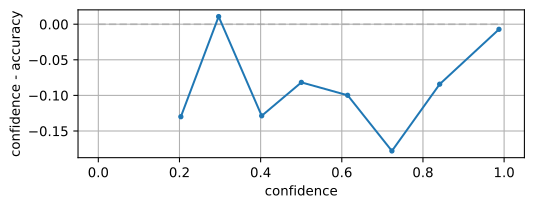
Expect for very low confidence, where usually we do not have enough information to obtain a reliable ECE, the model seems well calibrated, since the difference between confidence and accuracy is close to 0 for most confidence bins.
Calibrate only a subset of model parameters#
With the only purpose of demonstrating the functionality, let us now show how you can start from a pre-trained model and fine-tune only a subset of model parameters, perhaps with the purpose of achieving better calibration.
All you need to do is pass freeze_fun to the Optimizer in the Config object, and declare which parameters you want to be trainable and which frozen. In this example, the parameters of the LeNet-5 model in use are internally organized in a deep feature extractor sub-network (dfe_subnet) and an output sub-network. Then we simply freeze dfe_subnet and let the model fine-tune only the output layer.
In order to start from the pre-trained state, we simply enable the flag start_from_current_state in the Checkpointer.
[9]:
from fortuna.calib_model import Optimizer, Checkpointer
[10]:
status = calib_model.calibrate(
    train_data_loader,
    val_data_loader=val_data_loader,
    config=Config(
        monitor=Monitor(early_stopping_patience=2, metrics=(brier, acc)),
        checkpointer=Checkpointer(start_from_current_state=True),
        optimizer=Optimizer(
            freeze_fun=lambda path, v: "frozen" if "dfe_subnet" in path else "trainable"
        ),
    ),
)
Epoch: 4 | loss: 0.0048 | brier: 0.01409 | acc: 0.99219: 3%|▎ | 3/100 [01:25<46:06, 28.53s/it]